
|
|
#1
 02-18-2008, 10:45 PM
|
|||
|
|||
|
questions on how to create a form
can someone teach me how to create a form used to gather infomation entered by a user?
I need to do it in this way. If I pressed a key such as 'p', the animation would be paused. Then the form comes up. After the form is filled in, I press a 'submit' button to pass them to somewhere. I already tried to use vizinfo and vizmenu. but they can just show a list , not a real form like what we did in the Microsoft Office. Thanks a lot 

|
|
#2
02-20-2008, 10:36 AM
|
|||
|
|||
|
You can try using the undocumented vizdlg module for displaying forms. It allows more advanced form layouts and dialog like components. Here is sample code that creates a custom dialog/form and displays it when the 'p' key is pressed:
Code:
import viz
viz.go()

import vizdlg

class MyForm(vizdlg.Dialog):

	def __init__(self,**kw):

		#Initialize base class
		vizdlg.Dialog.__init__(self,**kw)

		#Add row of checkboxes
		row = vizdlg.Panel(layout=vizdlg.LAYOUT_HORZ_BOTTOM,border=False,background=False,margin=0)
		row.addItem(viz.addText('Checkboxes'))
		self.check1 = row.addItem(viz.addCheckbox())
		self.check2 = row.addItem(viz.addCheckbox())
		self.check3 = row.addItem(viz.addCheckbox())

		#Add row to dialog content section
		self.content.addItem(row)

		#Add a subgroup containing slider/textbox
		group = vizdlg.Panel()

		#Add row for slider to subgroup
		row = vizdlg.Panel(layout=vizdlg.LAYOUT_HORZ_BOTTOM,border=False,background=False,margin=0)
		row.addItem(viz.addText('Slider'))
		self.slider = row.addItem(viz.addSlider())
		group.addItem(row)

		#Add row for textbox to subgroup
		row = vizdlg.Panel(layout=vizdlg.LAYOUT_HORZ_BOTTOM,border=False,background=False,margin=0)
		row.addItem(viz.addText('Textbox'))
		self.textbox = row.addItem(viz.addTextbox())
		group.addItem(row)

		#Add group to dialog content section
		self.content.addItem(group)

		#Hide cancel button
		self.cancel.visible(0)

		#Rename accept button to 'submit'
		self.accept.message('Submit')

import viztask

def FormTask():

	#Create input form
	form = MyForm(title='Form title')

	#Link form to center of screen
	viz.link(viz.MainWindow.CenterCenter,form)

	while True:

		#Wait for 'p' key to be pressed
		yield viztask.waitKeyDown('p')

		#TODO: Pause simulation

		#Display form
		yield form.show()

		if form.accepted:
			#User pressed 'Submit', process data
			print 'Checkboxes:',form.check1.get(),form.check2.get(),form.check3.get()
			print 'Slider:',form.slider.get()
			print 'Textbox:',form.textbox.get()

		#TODO: Resume simulation

	#Remove form when completely finished with it
	form.remove()

viztask.schedule( FormTask() )
|
|
#3
02-20-2008, 07:25 PM
|
|||
|
|||
|
Wow.....many thanks. I really appreciate it. This is exactly what I considered. If the vizard could create many complex models, there should be some ways to make tables. However, could you plz tell me how I can get the specific use of this module? I just tried your sample code and part of my purpose already was achieved. As you mentioned , something more advanced is allowed. How can I do it? Since this module is not documented , it's really hard to know its exact usage which is vital to me.
Regards Last edited by xingxing; 02-20-2008 at 07:29 PM.
|
|
#5
02-27-2008, 07:11 AM
|
|||
|
|||

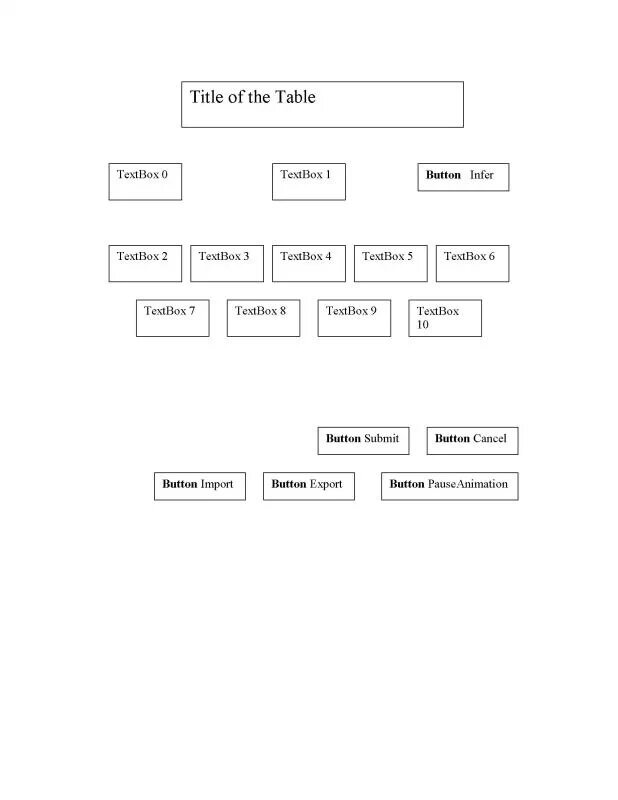 I finally got a place to upload the form in jpg format. This is basically what I wanna do. In addition , as the example provided previously, I also need the animation paused when I presss the "P" key. Is there an easy way to do this? I really need this "pause" action. Thanks for help. 
|
|
#9
06-12-2008, 11:36 AM
|
|||
|
|||
|
How would I rewrite this so that the vizdlg is not in a yield statement. I try calling form.show() directly and nothing is displayed. I want to gather some user information then loop on a set of inputs. I would like to use vizdlg for the control I have over the form.
__________________
VizMaster 
|
|
#10
06-12-2008, 05:29 PM
|
|||
|
|||
|
The show method just sets the dialog visible, waits for either the accept or cancel button to be pressed, then hides the dialog. If you do not want to use a task, then you can manually perform these steps. Here is the code for the show command:
Code:
def show(self):
	"""Create task that displays dialog"""

	#Show dialog
	self.visible(1)

	#Yield until accept or cancel button is released
	d = viz.Data()
	yield viztask.waitButtonUp([self.accept,self.cancel],d)

	#Save whether the dialog was accepted
	self.accepted = d.button is self.accept

	#Hide dialog
	self.visible(0)
|
|
#12
06-13-2008, 10:33 AM
|
|||
|
|||
|
You should not be using yield statements if you are not using tasks. Here is a sample script that displays a dialog without using tasks. Use the spacebar to toggle the visibility of the dialog.
Code:
import viz
import vizdlg
viz.go()

#Create empty dialog
dlg = vizdlg.Dialog(title='Dialog title')

#Link dialog to center of window
viz.link(viz.CenterCenter,dlg)

#Toggle dialog visibility when spacebar is pressed
vizact.onkeydown(' ',dlg.visible,viz.TOGGLE)

viz.add('gallery.ive')
|
|
#13
06-13-2008, 11:50 AM
|
|||
|
|||
|
Thanks, This is what I ended up with, but I don't want to display the gallery until I hit accept. I want to wait for the dialog to be done. Say the dialog asks for the user to make a button choice then accept before the gallery is displayed.
import viz import vizdlg viz.go() #Create empty dialog dlg = vizdlg.Dialog(title='Dialog title') #Link dialog to center of window viz.link(viz.CenterCenter,dlg) #Toggle dialog visibility when spacebar is pressed vizact.onkeydown(' ',dlg.visible,viz.TOGGLE) # Look for the Accept button to be pressed. vizact.onbuttondown(dlg.accept,dlg.visible,viz.TOG GLE) viz.add('gallery.ive')
__________________
VizMaster
|
|
#14
06-13-2008, 12:05 PM
|
|||
|
|||
|
Is there a specific reason you don't want to use tasks? They are made for these type of cases where you want a linear flow of operations. Either way, here is how you would handle this without tasks. The code sets up a callback for the accept button and calls a function when it is clicked.
Code:
import viz
import vizdlg
viz.go()

#Create empty dialog
dlg = vizdlg.Dialog(title='Dialog title')
dlg.visible(1)

#Link dialog to center of window
viz.link(viz.CenterCenter,dlg)

#Hide dialog and add gallery when accept is pressed
def DialogAccept():
	dlg.visible(0)
	viz.add('gallery.ive')
vizact.onbuttonup(dlg.accept,DialogAccept)
|
|
#15
06-13-2008, 01:16 PM
|
|||
|
|||
|
I am new to this type of programming. If you add a
print 'The End' at the end of the script the print statement is executed. This tells me execution continues. So I must not be approaching this the right way. What I am trying to do is prompt a user for his name. He enters it using a onscreen keyboard I have coded. Once the user has entered their name they loop over a sequence of dialogs for a set amount of time. In my code the other dialogs appear since the execution continues.
__________________
VizMaster
|
|
#16
06-13-2008, 04:19 PM
|
|||
|
|||
|
If your print statement is in the global scope then it will be executed during the script loading. All that sample code does is register a callback for when the accept button of the dialog is clicked and calls the specified function. If you need to display a series of dialogs sequentially, then I highly recommend using tasks. Using a callback approach will become very difficult once you have more than one dialog.
|
 |
|
|
 Similar Threads
|
||||
| Thread | Thread Starter | Forum | Replies | Last Post |
| Create my own animations | michelcm3 | Vizard | 1 | 09-21-2007 09:53 AM |
| how to create morph from the comple characters CD | michelcm3 | Vizard | 9 | 07-19-2007 10:15 AM |
| Alpha and Texturing questions | Manny | Vizard | 3 | 03-08-2007 11:55 AM |
| General Questions about Vizard: World Viz | dav | Vizard | 5 | 08-28-2006 03:44 PM |
| Antialiasing questions | oodini | Vizard | 1 | 12-06-2005 12:08 PM |


 Linear Mode

